Home Device Decoradtech:Most smart home guides ignore one thing: how your home looks. You buy a smart plug, a camera, a hub. Suddenly your shelf has wires everywhere and a plastic box glowing next to your lamp.
That’s the problem decoradtech solves. The word combines “decoration” and “advanced technology.” A home device decoradtech setup means tech that does its job without shouting for attention. It blends in. It serves the room instead of taking it over.
This guide explains the idea in simple terms. You’ll learn which devices to start with, where to place them, how to hide the mess, and what to check before you buy.
What Does Decoradtech Actually Mean?
Decoradtech is not a single product. It’s an approach.
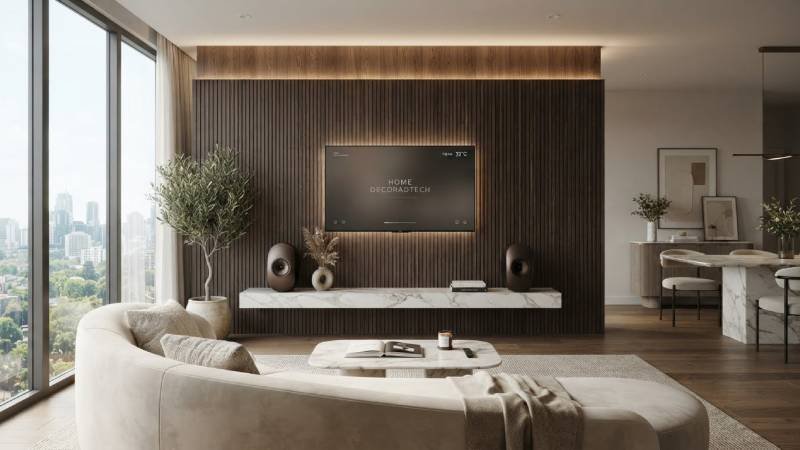
The idea is simple: pick smart devices that match your interior style, then install them so they stay out of the way. Think of a thermostat in a warm metal finish instead of a chunky white puck. Or a speaker tucked into bookshelves instead of sitting on the dining table.
The goal is a home that feels calm and looks designed — but still responds to your voice, your schedule, and your phone.
There are three rules that most decoradtech setups follow:
- Function first. Every device must earn its place. If it doesn’t save time, money, or effort, skip it.
- Blend, don’t hide completely. Devices should fit the room, not disappear behind furniture where they can’t work.
- Less clutter, less cable. Fewer devices doing more work beats a drawer full of gadgets.
Why This Approach Beats Buying Random Gadgets
Many people start their smart home the wrong way. They see a deal, buy the gadget, and figure out placement later. Six months later, they have ten apps, dead batteries, and zero real benefit.
Decoradtech flips the order. You look at your room first. You notice where light is bad, where heat escapes, or where you always forget to turn things off. Then you buy the device that fixes that exact problem.
The result? You spend less. You install less. And each device actually gets used daily.
Starter Devices Worth Buying First
You don’t need a full home system on day one. Start with two or three devices that solve real problems.
Smart Lighting
This is the easiest win. Smart bulbs change brightness and color temperature. Warm white in the evening, cooler light while you work. No rewiring needed — you screw in a bulb and connect it to an app.
Tip: choose bulbs with a finish that matches your lamps. Matte black, brass, and white are the common options.
Smart Thermostat
Heating and cooling eat most of your energy bill. A smart thermostat learns your schedule and cuts waste. Many models now come in slim designs with metal or fabric finishes, so they look like part of the wall, not a gadget bolted to it.
Video Doorbell
Home Device Decoradtech:A doorbell camera adds real security. Pick one that matches your door’s style. Modern versions come in muted colors and simple shapes that don’t look like surveillance equipment.
Smart Plugs
The quiet heroes. A smart plug makes any ordinary lamp “smart” for a low price. They hide behind furniture, so décor impact is zero.
Smart Curtains or Blinds
Home Device Decoradtech:Motorized window coverings used to be a luxury. Prices have come down. They’re also one of the few devices that genuinely improve a room’s look, because curtains open and close on schedule without chains or cords hanging around.
A Simple Buying Checklist
Before any purchase, run through these five questions:
- Does it solve a problem I actually have? Not a problem an ad invented.
- Will it match my room’s colors and materials? Check finishes and sizes, not just features.
- Does it work with the ecosystem I already use? If your phone is Android and the device only suits one closed ecosystem, you’ll fight it forever.
- Can it run locally? Devices that work without the internet keep working when your Wi-Fi drops.
- Is there a subscription? Some cameras charge monthly for basic features. Know before you buy.
If a device fails two or more of these, walk away. There’s always another option.
Placement: Where Tech Meets Design
Home Device Decoradtech:Placement is where most smart homes go wrong. Here’s how to get it right.
Follow the Device’s Needs, Not the Outlet’s
A sensor shoved behind a sofa because that’s where the plug is won’t sense anything. Map out where each device needs to be for best performance first. Then solve power and cabling.
Hide the Wires, Not the Device
Wires are the number one décor killer. A few fixes:
- Use cable channels painted to match the wall.
- Route cords along baseboards and behind furniture legs.
- Choose battery-powered versions where possible, even if you recharge them now and then.
Match Finishes Room by Room
Walk through your home and note its main tones. Cool grays? Warm woods? Buy devices in the same family. A black plastic camera on a white wall looks like a bug. The same camera in white practically vanishes.
Keep Voice Assistants Honest
Speakers with microphones belong where you talk to them — kitchen, living room. Not bedrooms. That’s both a design and a privacy choice.
Privacy Tips Most Guides Skip
Smart devices listen, watch, and record. That’s the deal. Here’s how to stay in control.
Check the settings on day one. Most devices ship with data sharing turned on by default. Turn off what you don’t need.
Use guest networks. Put your smart devices on a separate Wi-Fi network from your laptop and phone. If If one device is hacked, your other connected devices remain protected.
Cover cameras you’re not using. A physical shutter or a simple slider beats trusting software.
Mute microphones in private rooms. Most speakers have a hardware mute switch. Use it — especially in bedrooms and bathrooms.
Read the privacy policy length, not just the words. If a light bulb company needs ten pages of legal text, ask why.
Common Mistakes to Avoid
- Buying everything at once. One room at a time. Learn what works before scaling up.
- Mixing too many apps. Pick one ecosystem and stick with it where you can. Your mornings get much simpler.
- Ignoring guests. If your lights need an app to turn on, visitors will struggle. Keep physical switches working.
- Forgetting maintenance. Batteries die, firmware updates pile up. Put a reminder in your calendar once a season.
- Chasing features. A bulb with sixteen colors is fun for a week. A bulb that fades gently at bedtime is useful for years.
Final Thoughts
A smart home doesn’t have to look like a server room. The home device decoradtech mindset asks one question before every purchase: will this improve how my home works and how it feels?
Start small. Solve real problems. Match your finishes. Hide your cables. Protect your privacy. Do those five things and your home gets smarter without getting louder — and that’s the whole point. Visit decoradetech